Scenes
← README · Why Scroll Studio · What's new · Examples · Guide: make a site · Styles · Scenes · Licence
Your product, declared once
Declare the product a site is about once, at the top of site.yaml, and every part of the site uses the real thing:
product:
  name: Flipper Zero
  maker: Flipper Devices
  url: https://flipperzero.one
  model: https://example.com/flipper-zero-body-3d.stp   # GLB/glTF, OBJ, FBX, STL, PLY, STEP/STP or 3MF; file or URL
  licence: GPL-3.0
  concept: true                  # footer: "Concept page. Not affiliated with Flipper Devices."
  rotation: [0, 90, 0]           # up / units / rotation fix any file's axes and scale
  parts:                         # materials by part name (globs), material name, or a region of a one-piece body
    - { match: "*", color: "#e9e7e0", roughness: 0.55 }
    - { match: "*", region: [0.235, 0, 0.28, 0.62, 0.35, 0.85], facing: front, color: "#111214", roughness: 0.05 }
sections:
  - type: hero
    title: A pocket multi-tool for hardware.
    image: { product: three-quarter, size: [1920, 1080] }          # a Cycles still, cached
  - type: product
    title: Every port where you need it.
    image: { product: { view: detail, part: "*usb*" } }            # a macro view of one part
  - type: product
    title: On your desk.
    image: { product: hero-low, scene: "a walnut desk by a window, morning light" }
  - id: live
    type: showroom                 # the real model live in the page: scroll turns, explodes and zooms it
The engine converts the model (STEP through OpenCascade, keeping every part and its name; 3MF through trimesh),
fixes its axes and units, centres it on its base, applies the part materials, decimates only an absurdly heavy file
and caches one GLB. studio product <project> --parts lists the part, assembly and material names to target;
studio product <project> --still exploded renders a still. Views: front, three-quarter, side, top, back,
hero-low, exploded (when the model has parts) and detail (with part:). A still is transparent where the page
can show it (hero and product blocks) and on the theme background elsewhere; scene: paints a place around it with
Z-Image to the still's own camera, lights the product with that place, and blends it in with a light Qwen-Image-Edit
pass (checked: if the edit changed the product, the rendered product is put back through its matte).
A take's product: {} and a sequence's model: product use the same model, materials and credit; the credit and
licence go in the footer automatically.
Inside the product (type: inside)
The product as the set. The camera flies into the product and the page happens inside it: between the layers of a
board, past the cone and magnet of a speaker, along a keyboard's switches. Each feature is a stop at a named part, with
its copy arriving there; the scale is macro (long lenses, shallow depth of field, light from a lamp that travels with the
camera and a rim light behind the part). It is rendered offline by Cycles from site.product and scrubbed by scroll like a
sequence; nothing runs in the browser but a canvas.
product:
  name: Framework Laptop 12 mainboard
  model: https://github.com/FrameworkComputer/Framework-Laptop-12/raw/main/Mainboard/FRAMEWORK_LAPTOP_12_MAINBOARD_V01.stp
  licence: CC BY 4.0
sections:
  - id: inside
    type: inside
    steps:                                    # leading `intro: true` steps are shown over the opening wide shot;
      - { intro: true, title: "Go <em>inside</em> the mainboard." }
      - { kicker: "04  The fan", title: "A fan 53 mm across." }     # then one step per stop, in order
    stops:                                    # omit for automatic stops chosen from the model's named parts
      - { part: "IMP_*", span: 96, pitch: 22, roll: 3 }            # glob on part, mesh or assembly names
      - { part: "PHO16_DDR5_CARD*", aim: [0.25, 0.5, 1.0], focus: "*MYLAR*" }
      - { point: [0.9, 0.2, 0.5], lens: 85 }                       # a model with no named parts: stops at points
What the engine does with it (engine/inside.py, engine/scenes/inside.py, backends/blender_scripts/inside.py):
- Stops.
partis a case-insensitive glob on part, mesh and assembly names (a part's own name wins over mesh names;Driver/*finds everything in an assembly); several matches are framed together. A glob that matches nothing stops the build with the closest names andstudio product <project> --parts; a model that is one mesh gets an explanation and thepoint:alternative.spanis how wide the view is at the focal plane in millimetres of the real product (macro: 8-40; the default frames the part with a margin, never wider than 40% of the product),lens,fstop(default f/11, real macro optics),focus(rack focus to another part),roll,explode(open the assembly at a stop),aim(where in the part),yaw/pitch(the side the camera comes in from; by default the clearest, close to the previous side). - The route. An opening wide shot, a flight to each stop (a curve that leaves the surfaces, eased so the camera
lands softly, the aperture closing in flight), a slow creep while it rests, and a pull-back (
establish,outro). Scroll distance follows: each stop'sholdandtravelin screens add up to the section'slength(set it to override). - A cutaway. Parts between the camera and the stop (a fan cover, a heat spreader, a cabinet wall) dissolve for the
frames the camera is behind them, so it can see and fly through a closed assembly. The dissolve is worked out with ray
casts over the whole route and smoothed in time (it starts before the camera arrives and ends after it leaves).
cutaway: falseturns it off. - Light along the flight.
light:keys change the light as the page scrolls: each key sets any ofexposure,ambient,lamp,rimandlamp_colorat a point of the scene's progress (the restsstudio insideprints), eased between keys, the scene's own values wherever no key says otherwise. A night routine can go from evening to one lamp to lights out:light: [{at: 0, exposure: 0.6}, {at: 0.5, lamp_color: "#ffc98a", ambient: 0.15}, {at: 1, exposure: -2.5, lamp: 0.4}]. Only frames whose light changes are redrawn; a flight without keys keeps its frames. - The copy. Steps without an
atare placed on the route (intro steps over the wide shot, then one per stop while it rests, extra steps over the pull-back), and the subject sits off-centre (offset, towardsside) so the words have the other half. - Cache. Every frame is keyed by its own camera and the frames around it that the dissolve looks at: change one stop's lens and only the frames near it are redrawn; changing copy, vignette or grain redraws nothing.
- Phones, reduced motion. A 960 px set for phones; with
prefers-reduced-motionthe page shows one still per stop (the opening frame, each stop's resting frame when its copy arrives, the closing frame) and downloads only those; scrolling is never captured. - A shared GPU. The renderer uses the GPU, or the CPU when the GPU has under 2 GB free (a Cycles scene that cannot get its
memory stalls instead of failing);
STUDIO_INSIDE_DEVICE=cpu|gpuforces one, and a render that makes no progress for 15 minutes (STUDIO_INSIDE_STALL, seconds) is stopped and the remaining frames finish on the CPU. Frames are kept as they finish, so an interrupted build resumes where it stopped. On a 4090 the example's 284 frames at 1600x900 and 64 samples take about half an hour with the GPU to itself; the desktop set is about 33 MB and the phone set 5 MB. - Authoring.
studio inside <project> [--still all|wide|3,5] [--strip 8]prints the route (parts found per stop, view, camera side, where the stop rests and its copy sits) and renders quick stills and a contact sheet; the MCP toolinside_routedoes the same.studio storyboardshows the wide shot and a still per stop.
The one-take page (journey:)
The whole landing page is one camera journey through one generated world. Each section is a place in it (the hero at the door, features as rooms, the product on a table, the rates at the window, the call to action at the view), the camera travels between the places in one unbroken move, rests at each while its content is read, and moves on. No section breaks, only travel. The page's blocks (hero, intro, features, stats, quote, faq, product, cta ...) arrive at their stop, set as part of the place instead of over it. Example: Fenmoor, a farmhouse to stay in.
- id: stay
  type: film
  journey:
    world: The inside of an old stone farmhouse on a northern moor at dawn, a long whitewashed hall ...   # described once
    restore: 1080
    blockout: { objects: [ ... ] }                                                                      # the world as shapes: walls, arches, a table, a window
    stops:
      - id: door
        place: the view from just inside the open oak front door down the whole length of the house
        pose: { at: [0.15, -0.4, 1.55], look: [0, 12, 1.3] }        # where the camera rests here
        hold: 1.6                                                    # screens of scroll the page rests at this place
        blocks:
          - { type: hero, title: "Come in. <em>The door is open.</em>", buttons: [ { label: Reserve a night, href: "#view" } ] }
      - id: hearth
        place: a whitewashed room with a stone fireplace and a low fire burning
        pose: { at: [0.9, 2.6, 1.5], look: [-1.8, 2.2, 1.0] }
        move: { seconds: 5, path: [ { at: [0.4, 1.0, 1.55], look: [-0.8, 3.0, 1.3] } ] }   # how the camera gets here
        blocks: [ { type: features, items: [ ... ] } ]
studio journey <project> prints the plan (every move and hold with its film seconds and scroll screens, and, once built,
where each stop's blocks sit and the contrast they reach); studio build --plan prices it; the MCP tool journey_plan does
the first. studio storyboard --level sketch shows the blockout at every stop before anything renders.
Two ways to make the film, both from the same stops, blocks and runtime (measured: docs/ENGINE.md):
- One take (
blockout:set): the world is rough shapes, the camera a real 3D path through it that rests at every stop (pose,move.path). Blender renders the depth along the path, each stop's picture is painted over its depth (Z-Image Turbo) and LTX-2.3 paints the world between the stops, cut at the middle of a hold where the camera is at rest. The camera can go through a door into a room the first picture never showed. - A chain (no
blockout): each move is a keyed camera move on a moving shot (camera:) flown through the picture the last stop left, followed by a frozen moment of the frame it arrived at (freeze:); every picture comes out of the one before, so nothing can drift in style and every join is on the same frame. The camera can only go into what the picture before it shows (move.into: the doorway, the window, the far end of the street), so it suits a facade, a street or a landscape, not a house the first picture does not show the inside of.
What the page does. Scroll maps to the film through a piecewise map: a move plays as you scroll through it, a hold is the
page resting at a stop, and the camera is at rest whenever the page is, so every stop lands softly without the page ever
taking the scroll from the reader (it is an ordinary sticky stage; there is no snapping, no wheel capture and no lock). A
rail down the edge names the places and scrolls to them (and #hearth in the address lands on a stop). The blocks of a stop
are placed where the picture is calmest (least detail, so nothing important is covered, alternating sides) in lettering that
clears WCAG AA against the picture under it, with a soft scrim raised only as far as it must be; side, form
(type, rail, cards, plaque) and surface override the choice. On a phone the wide picture is cropped around each
stop's focus and the blocks sit in a sheet at the bottom. With reduced motion, or no JavaScript, or a film that fails to
load, the page is the stops as stills (taken from the film) with their blocks, in order, and no film is downloaded.
One Take, places and data
A film scene with a take: is one continuous shot. objects are rough shapes (box, cylinder, cone, blob,
plane, scatter for forests or towns), camera is a list of {t, at, look} keys, and product is your 3D model
(model: inputs/bottle.glb, from_photo: with TRELLIS configured, or product: {} for the site's product) standing
at a point in that world. The world is generated; the product is rendered through the same camera and lit by the plate
itself (environments built from the generated frames, the sun along the take's light, its shadow and occlusion on a
ground of the plate's colour), with depth of field and motion blur, then graded to the plate (black level, white
balance, saturation, softness, grain, a light wrap). hdri: picks a studio light instead:
  - id: take
    type: film
    take:
      duration: 15
      objects:
        - { kind: box, name: Table, at: [0, -5, 0.75], size: [1.6, 0.9, 0.06], color: "#9a7b56" }
        - { kind: scatter, count: 60, area: [-120, 40, -30, 140], height: [6, 14], shape: cone, color: "#3f5538" }
      camera:
        - { t: 0, at: [-70, 190, 70], look: [0, 40, 6] }
        - { t: 15, at: [1.6, -3.4, 1.3], look: [0, -5, 0.95] }
      product: { model: inputs/bottle.glb, at: [0, -5, 0.78], height: 0.27 }
      ltx: { segments: [...] }          # the video model's settings: one prompt per stretch of the camera move
For detail, render the world at ltx: { res: [1920, 1088] } (multiples of 32; 1024x576 is a quick draft) and add
restore: 1080: SeedVR2 cleans and redraws the generated world before the product is composited, so the real
product is never touched by restoration.
A splat scene takes a scan (source: inputs/house.ply or a gsplat checkpoint) and camera keys with {t, at,
look}; the build trims faint and oversized splats, keeps the max_splats most visible and writes SPZ.
A chart can carry callouts resolved from the data ({series: Denmark, at: last, label: "Denmark {y} in {x}"};
at is max, min, first, last or an x value), and a stats item can take its number from a chart:
{ unit: "%", label: World share, data: { section: share, series: World, at: last } }.
A story in shots
A film with beats: tells a story shot by shot. Each beat is a still generated from its prompt (or your own
image), brought to life by its motion with LTX-2.3, and the shots are joined with short crossfades. Every beat is
cached on its own, so changing one shot re-renders only that shot. Steps pin themselves to a beat with
state: { beat: <id> }:
  - id: story
    type: film
    length: 26
    beats:
      - id: door
        seconds: 5
        prompt: A weathered wooden door standing alone in an endless desert at dusk, warm light through the gap, photoreal
        motion: the door swings open, golden light and dust pour out, the camera pushes in
      - id: clash
        prompt: Two hoplite shield walls colliding on a dusty plain, bronze and red cloaks, low angle, photoreal
        motion: the shield walls crash together, dust bursts outward, slow motion
    steps:
      - { title: A landing page is the door <em>to a world.</em>, intro: true, state: { beat: door } }
Each join is a crossfade of the film's beat_fade; a beat's own fade: sets the join into it: fade: 0 is a hard cut
(a reverse angle, a jump to a new moment, where a dissolve would show two poses at once as a double image), and a longer
value a slower dissolve. Every timing that reads the film (steps pinned to a beat, reveal regions, studio inspect,
the trailer) follows it; the storyboard's stand-in film still dissolves every shot with beat_fade.
beat_res sets the render size (default 1920x1088; about seven minutes a five-second beat on an RTX 4090). LTX animates
slow, camera-led motion best; for an action shot that holds its first frame, lower strength (0.7-0.85), re-roll the
motion alone with motion_seed, and cut the hold with trim (seconds, re-uses the render).
Example: Feel.
A frozen moment
When time stops, stop generating. A video model cannot hold a crowd still while the camera moves (the people melt and
drift), and redrawing close-ups with an image editor gives every close-up different faces. A beat with freeze: is
not generated at all: it takes one frame, upscales it, estimates its depth (Depth Anything V2) and flies a 2.5D camera
through it, offline, in seconds. Every pixel of the clip is a pixel of that one frame, so a woman's face is the same
face in the wide shot and in the close-up of her hand. The clip joins the film like any generated beat: same stage,
cache, trim, crossfade, beat_restore, locked, build --only, storyboard card and editor fields.
    beats:
      - id: walk
        seconds: 5
        prompt: A crowd walks toward the camera across a plaza, a woman and a man side by side in the centre
        motion: the crowd walks steadily toward the camera, the camera tracks backward in front of them
        image: inputs/crowd.png
      - id: freeze
        seconds: 12
        freeze:
          from: walk              # the last frame of a beat (its sharpest of the last 6), or `image:` (any image input)
          upscale: 2              # SeedVR2 image restoration through ComfyUI, so crops stay sharp
          camera:                 # keyframes over the beat (0-1): a framing box [x0, y0, x1, y1] in the frozen frame
            - { t: 0,    box: [0, 0, 1, 1] }
            - { t: 0.3,  box: [0.25, 0.2, 0.75, 0.68] }
            - { t: 0.55, box: [0.26, 0.42, 0.58, 0.753], hold: 0.1 }      # rest on the hands for 10% of the beat
            - { t: 0.8,  box: [0.34, 0.732, 0.6, 1.0] }
            - { t: 1,    box: [0.25, 0.2, 0.75, 0.68] }
          parallax: 0.6           # the 2.5D depth effect (0 = flat Ken Burns); the subject plane stays put
          ease: inOutSine         # or flow: keep moving through keys instead of resting at each
          grain: 0.012            # a faint film grain so it matches the generated shots
      - id: walkon                # starts exactly where the frozen moment ends
        prompt: They walk on, the camera pulls back
        motion: time starts again, the two of them walk toward the camera, the camera pulls back
        image: { beat_frame: { beat: freeze, at: last } }
- The frame.
from: <beat id>freezes that beat's last frame after itstrim. A moving shot's very last frame is often motion-blurred, bad for close-ups, sopick: sharpest(the default) takes the sharpest of the lastpick_windowframes (6), measured inside the boxes the camera will look at;pick: lasttakes the very last.image:freezes any image input instead (a file,generate:,edit:, a crop, abeat_frame). - The camera. Boxes are in 0-1 of the frozen frame; the aspect comes from
beat_res, so a box of another shape is widened (never cropped) and everything inside it stays in frame. The camera arrives at each box at itst, rests for itshold, and travels to the next one along an eased path with no jerk at the keys (ease: inOutSine, inOutQuad, inOutCubic, inOutQuart, linear, orflow, one smooth curve that keeps its speed through keys and rests only at holds and at both ends). A full-frame box att: 0makes the first frame the frozen frame itself, so the cut from the shot it froze is invisible. - The depth effect. The camera sways a little and pushes near things in as it closes up (
parallax,dolly), against a focus plane that follows the middle of the view, so the subject holds still while the crowd around them shifts. The sway fades out where the view is too near the frame's edge to move.parallax0.3-0.8 is clean; above 1 you see stretching behind foreground edges (it is one photograph: nothing behind a person was ever drawn). - Sharp crops.
upscale: 2(1-4) enlarges the frame before the camera crops into it.upscale_method: autouses SeedVR2 (the 7B sharp model, through ComfyUI, about two minutes for a 1920x1088 frame at 2x) when ComfyUI lists its weights, else a local Lanczos + sharpen that is honest but soft;seedvr2andlanczosforce one. SeedVR2 redraws fine detail (wool, stitching, fingernails), so look at the close-ups. - Cheap to iterate. The frame, the upscale and the depth are cached apart from the camera: changing a box, the
parallax or the ease re-renders in seconds (about 20 s for 12 s of film at 1920x1088 on an RTX 4090) and never
repeats the upscale.
blur(0-1, the shutter) adds motion blur by averaging sub-frames. - Chaining.
image: { beat_frame: { beat: <id>, at: first | last | <seconds>, pick: last | sharpest } }is the frame of any beat, so a generated beat can start exactly where a frozen moment (or another generated beat) ends. A beat that uses it re-renders when that beat's clip does. Underbuild --only, a beat that is not rendered stands in with its storyboard still instead of failing. - A named move instead of keys.
move:takes the named moves of a generated beat (below:dolly-zoom,orbit-left,crane-up,dolly-in...) and flies the same rig through the frozen frame, so the vertigo of a dolly zoom or the arc of an orbit happens around people who stay exactly as drawn.atis the subject (the focus plane an orbit pivots on and a dolly zoom keeps the same size),amountscales the move. It replacescamerakeys (parallax,dollyandeasebelong to keys and are not used), and does not combine withdetailorlayersyet. Moves that start on a crop (orbit, crane, dolly zoom) do not begin on the whole frame, so a cut into them is a visible cut, not a continuation. Like any 2.5D move, wide arcs stretch the pixels behind near edges: keepamountnear 1 on a crowd.
    - id: stare
      seconds: 5
      freeze: { image: inputs/market-square.png, upscale: 2, move: { move: dolly-zoom, at: [0.5, 0.55] } }
The render is an inverse parallax warp in torch (a ray marched through the depth map per pixel, so the nearest surface
wins at an edge), on the GPU when there is one and the CPU otherwise; it needs no Blender session. The storyboard shows
the camera's boxes as flat crops of the source before anything renders, and build --plan prices a frozen beat apart
from a generated one.
Deep zoom and layered depth (freeze.detail, freeze.layers)
A frozen frame has only so many pixels: at a box a twentieth of the frame wide, 1920 px is a thumbnail enlarged twenty times (the 2x upscale buys one factor of two), and one depth map warped over one picture smears at every depth jump. Two fields on a frozen beat fix those.
      - id: push
        seconds: 14
        freeze:
          image: inputs/street.png
          upscale: 2
          camera:
            - { t: 0.0,  box: [0, 0, 1, 1] }
            - { t: 0.4,  box: [0.455, 0.80, 0.555, 0.96], hold: 0.05 }     # her boots
            - { t: 0.55, box: [0.485, 0.845, 0.53, 0.89] }                 # a 22x close-up of the boot's top
            - { t: 1.0,  box: [0, 0, 1, 1] }
          detail: { prompt: "hand-drawn ink, clean outlines, fine hatching" }   # deep zoom ({} for the defaults)
          layers: auto                                                          # layered depth (or a list of subjects)
- Deep zoom (
detail). The frame is built into a pyramid of tiles instead of being enlarged: from the camera's keys the engine finds which regions it visits at which scale (studio freeze <project> <beat> --planprints them), as many levels as the tightest box needs (levels: autostops when a tile pixel falls on every output pixel; each level adds at mostratiox the detail of the one above, default 2), and for each tile (a crop of its parent): SeedVR2 enlarges it, Z-Image Turbo re-draws it at lowstrength(0.3 by default: fine detail in the picture's own style, nothing moved), it is aligned to its parent (ECC), and then it is given the parent's low frequencies exactly (lock): colours, tone and shapes are the parent's at every level, and only what is finer than a parent pixel is new. Its depth is the parent's, snapped to the tile's own edges with the guided filter. The render takes every pixel from the finest tile that covers it and fades each level in by screen-space pixel density (a mip chain turned inside out), with feathered tile borders: detail arrives as the camera does and nothing swaps or pops. Every tile is its own cached stage, keyed by its box and its parent's key: moving the deepest box rebuilds only the tiles that moved. Measured on a 14 s push from a 1920 street to a 22x close-up (17 tiles, 4 levels): the sharpest edges take 5.6 output pixels at 20x against 11.3 for one upscaled frame (1.4 px at 1x, 1.8 at 2x), and the sharpness curve along the whole move is smooth: no level swaps. Needs ComfyUI (SeedVR2, Z-Image Turbo); without SeedVR2 the enlarge falls back to Lanczos. The Qwen-Image-Edit re-draw (method: qwen) understands the picture (it draws laces on a boot) but also moves and reshapes things by several percent, which a tile cannot be made to agree with (ghosting), so it is experimental. The pyramid sharpens and adds texture; it cannot invent an object the frame does not already contain (laces on a black silhouette): for that, give the freeze animage:that already has it. - Layered depth (
layers). The frame is cut into planes, back to front: a background plate (the frame with the subjects painted out: Qwen-Image-Edit through the subjects' mask, pixel-exact outside the hole) and subject planes (subjects: autofinds every person with Florence-2 and cuts each out with SAM 2.1, or list{prompt}/{box}/{points}subjects; subjects at a similar depth share a plane, at mostplanes). Each plane has its own smooth depth and a soft alpha edge, and its colour has the plate's share removed at the edge, so it carries no fringe of the old background. The render marches and samples the planes one after the other and composites them: at rest the result is the frame, and when the camera moves a person slides over the background instead of smearing, with real background revealed where they stood. The planes are cut from the same picture, and withdetailfrom the same tiles (each tile carries its planes' alphas, refined at its resolution, and continues the plate), so a layered deep zoom costs one attribute per plane per tile, not a pyramid per plane, and every level agrees by construction.planes.jpgin the beat'slayers/folder shows what was found. Limits: an occluded part of one person behind another is not drawn (the plate shows through instead); a plate fill leaves a faint pale ghost of the removed shape where the fog is uniform; and SAM cuts a person who is nearly the colour of the fog out only in part (look atplanes.jpg): the part left behind stays in the background plane and tears off the person when the camera sways. Name such a subject withpoints:on its body, or keepparallaxlow. - Measuring it.
studio freeze <project> <beat> --report [--against <other beat>]renders and measures the clip: how many output pixels the sharpest edges take at each zoom the camera reaches (a crisp edge is 1-2 px), a frame-to-frame difference plot with its spike ratio (a pop stands out of the curve), and a frame strip, written beside the clip.
A camera move on a moving shot (camera:)
A video model takes camera direction only as words, and mostly ignores them, so "the crowd keeps walking while the camera
pushes in to the girl" used to be a clip, then a cut to a still. A beat with camera: keys gets the camera it asks for
by construction. The keys have the shape of a frozen moment's ({t, box, hold} and an ease), but the beat is still
generated, so people walk, traffic moves and fog drifts:
      - id: push
        seconds: 5
        prompt: A hand-drawn faceless crowd walking toward the viewer, one girl in the centre
        motion: everyone in the crowd walks steadily toward the viewer down the foggy street
        image: inputs/street.png
        camera:
          keys:
            - { t: 0.0, box: [0, 0, 1, 1] }                  # the wide street
            - { t: 0.5, box: [0.40, 0.38, 0.62, 0.97] }      # the camera has reached the girl
            - { t: 1.0, box: [0, 0, 1, 1] }                  # and is back out again
          subjects: the people                               # who is free to move (default)
What happens, each step cached by its own digest in the beat's folder:
- Depth and people. The beat's start image gets a depth map (Depth Anything V2) and the moving subjects (
subjects) are found by Florence-2 and cut out by SAM 2.1, the wayedit.regiondoes. - The guide. The camera path is flown through that depth with the same renderer a frozen moment uses (parallax and
all), as a depth video. The subjects' depth is blurred into soft blobs (
soften), so the guide fixes the camera and the static world (street, buildings, lamps) and only hints where the people are. Two more videos come with it:guide_rgb.mp4, the picture itself flown along the keys (a pure-camera preview you can look at before a minute of GPU is spent:studio camera <project> <beat> --guide), andguide_static.mp4, where the static world is. - The shot. LTX-2.3 (the IC-LoRA depth control a take uses) paints the beat along the guide from the start image,
with frames of the pure-camera render pinned along the way (
anchor: once a second and at the end, which keeps the subjects' looks and sharpens close-ups). It runs at about 1024x576 (camera.res; at 1536x896 the girl's black coat turned white in a test) and is scaled tobeat_res: addbeat_restore: 1088to the film for the fine detail.backend: wanruns Wan 2.2 Fun Control on the same guide;backend: uni3cis Wan's camera controlnet (needs a file that is not installed by default, see docs/INSTALL.md; the engine fails with its name, URL and folder when it is missing). - The measurement.
studio camera <project> <beat> --checkregisters every generated frame against the first on the static world and reports how far the camera is from the keyed view (zoom error in %, shift in view widths), how far the people walked, and what a perfect camera scores on the same measurement; it writescamera.jsonand a contact sheet.
Beats that continue one another share one camera. camera.continues: true makes the beat start where the previous
camera beat ended, at the speed it ended at (a chain flows as one smooth path and rests only at its ends and on holds, so
there is no ease to a stop at the cut), start on that beat's last frame (beat_frame, exactly, unless it names an
image), and fly its guide through the chain's base plate (the first beat's start image: the world every beat of the
chain looks at, so a camera that pulls back out of a close-up has the wide street to fly through). Its frames are graded
back toward the plate's tone and grain (match, 0.7 when continuing), which stops a clip-to-clip drift in contrast, haze
and grain from showing at the cut.
      - id: in                      # pushes in and is still moving when the beat ends
        seconds: 3
        image: inputs/street.png
        prompt: ...
        motion: ...
        camera: { keys: [{ t: 0, box: [0, 0, 1, 1] }, { t: 1, box: [0.18, 0.10, 0.82, 0.80] }] }
      - id: out                     # carries on to the girl and back out, starting on the last frame of `in`
        seconds: 3
        prompt: ...
        motion: ...
        camera:
          continues: true
          keys: [{ t: 0.5, box: [0.40, 0.38, 0.62, 0.97] }, { t: 1, box: [0, 0, 1, 1] }]
trim and end_image do not combine with camera (the keys are timed over the whole clip; the path decides the last
frame). Cost: the depth and the people mask once per start image (about a minute, mostly model loading), the guide in
seconds, the shot as long as any LTX beat of that length (about 10 minutes for 5 s on a 4090). Changing a box re-renders the guide and the shot, not the depth.
Named moves (camera: dolly-in)
The moves a director asks for by name, each a tested recipe for the same pipeline: instead of boxes, the move is a rig (one camera per frame for the 2.5D renderer: the view, a sideways shift and a push per unit of depth against the subject's depth, and a roll), flown through the start image's depth into the guide, with the pure-camera render pinned along the way. The prompt gets the move's words too (and a static shot drops "static camera" from the negative prompt).
      - id: hero
        seconds: 4
        prompt: A white ceramic cup with steam rising on a cafe table, a plant close in the foreground, a window behind
        motion: steam curls up from the cup, cars pass outside
        camera: orbit-left                       # or { move: orbit-left, amount: 0.8, at: [0.55, 0.6] }
amount scales how far the move goes (1 is the tested recipe, 0.25 to 2), at is the subject (x y in 0-1 of the start
image): where a dolly or a zoom goes, the pivot an orbit or a crane keeps still, what a dolly zoom keeps the same size
(default the centre). Every keyed-move setting applies (backend, subjects, soften, guide_strength, res,
anchor, match, seed); continues does not (a named move starts its own shot; chain keyed moves across a cut).
Moves that start on a crop (dolly-out, orbit, crane, fpv, whip-pan, dolly-zoom) begin on the pure-camera render of the
first camera, sampled from the full-size start image so the crop stays sharp.
How each move reads on LTX-2.3, judged on contact sheets of two test subjects (a cup on a cafe table with a plant close in front and a street behind; a woman standing in a long cobbled street), 4 s at 1024x576, and measured against its pure-camera render (gain / parallax cosine, below):
| move | how it is made | verdict |
|---|---|---|
static |
the view held; the subjects free in the guide | reads: the frame stays put (0.008 px a frame of drift) while cars pass and steam curls |
dolly-in / dolly-out |
view 1 to ~0.7 on at, near things pushed harder (e up to 0.32) |
reads clearly (gain 0.99-1.05) |
crash-zoom |
a lens zoom (no parallax) from wide to 2.6x in a fifth of the beat, then a hold, guide motion-blurred | reads clearly; the close-up is soft until the finishing pass |
dolly-zoom |
a constant 0.7 view while near things grow and far ones shrink about the subject's depth | reads on a deep scene (the street stretches away behind the woman, who keeps her size); subtle on a shallow one (the cup's background is close) |
orbit-left / orbit-right |
a sideways shift per unit of depth that ramps from none to 0.16, pivoting on the subject's depth | reads as an arc of roughly 10-15 degrees: the foreground and background slide past the still subject (parallax cosine 0.92-0.99). Wider arcs need what 2.5D cannot show: the subject's other side |
crane-up / crane-down |
the same, vertical | reads, modestly: vertical parallax with the subject held; LTX adds a little of the change of angle (more of the coffee's surface as the camera rises) but the camera never gets to look down onto the subject |
fpv |
a fast push (0.9 to ~0.5) with a 4-degree banking roll and a little sway | reads as a banking push, not a fly-through: nothing is passed or flown around. With its light pinning (0.3) a face that ends up filling the frame drifts a little in look; set anchor: 0.6 for a person |
whip-pan |
a 0.62 view swept across the picture in a third of the beat, 1.5 frames of motion blur | reads clearly; LTX smooths the guide's sub-frame strobing into real blur and adds matching motion (a passing car) |
push-through |
a deep push (to ~0.3) with strong depth push, aimed past the foreground | reads as a deep push-in; travelling through an opening does not work in 2.5D (there is no picture behind the foreground to enter), so it is the same move as a stronger dolly-in. A close-up face drifts a little at its 0.3 pinning, as with fpv |
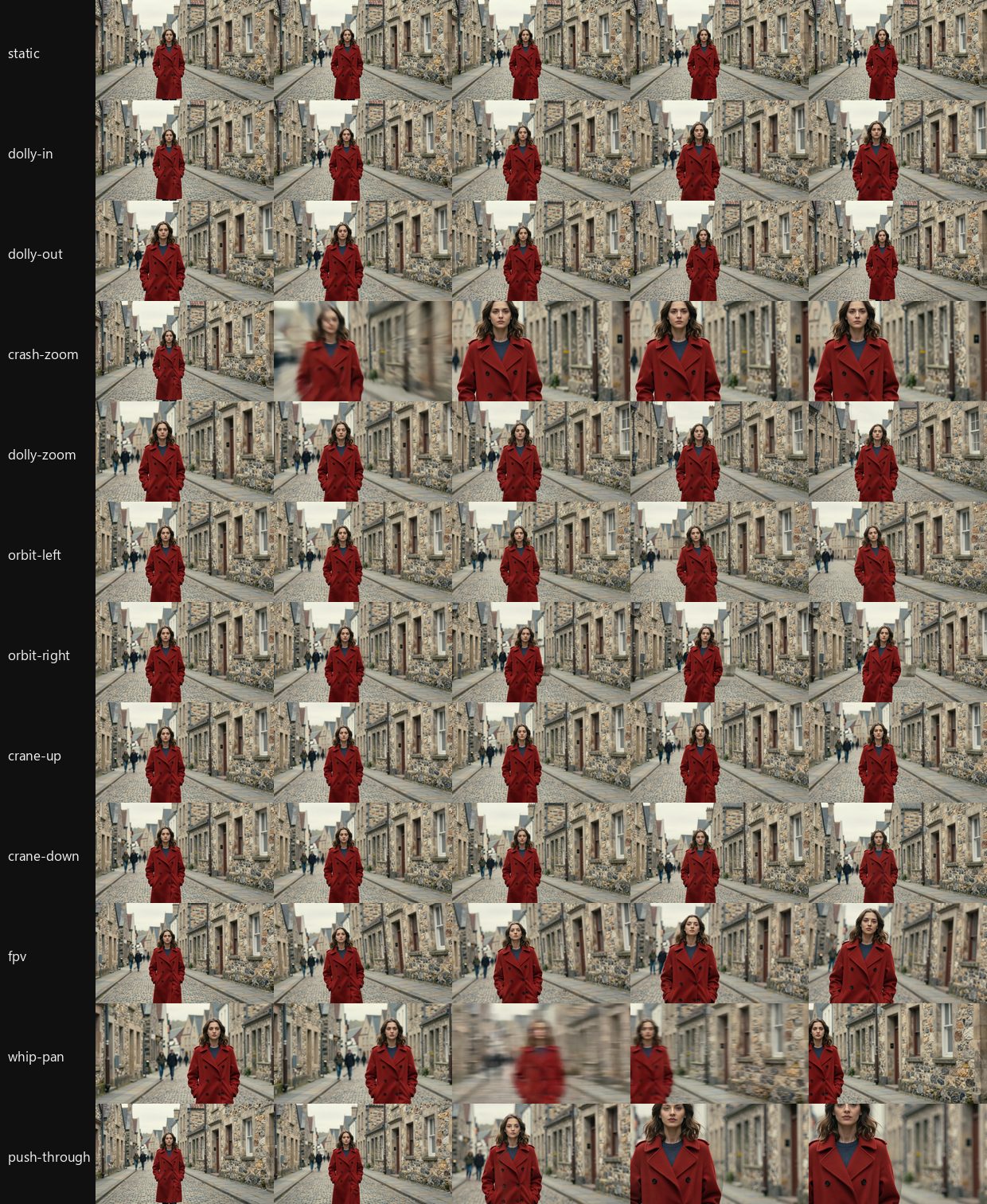
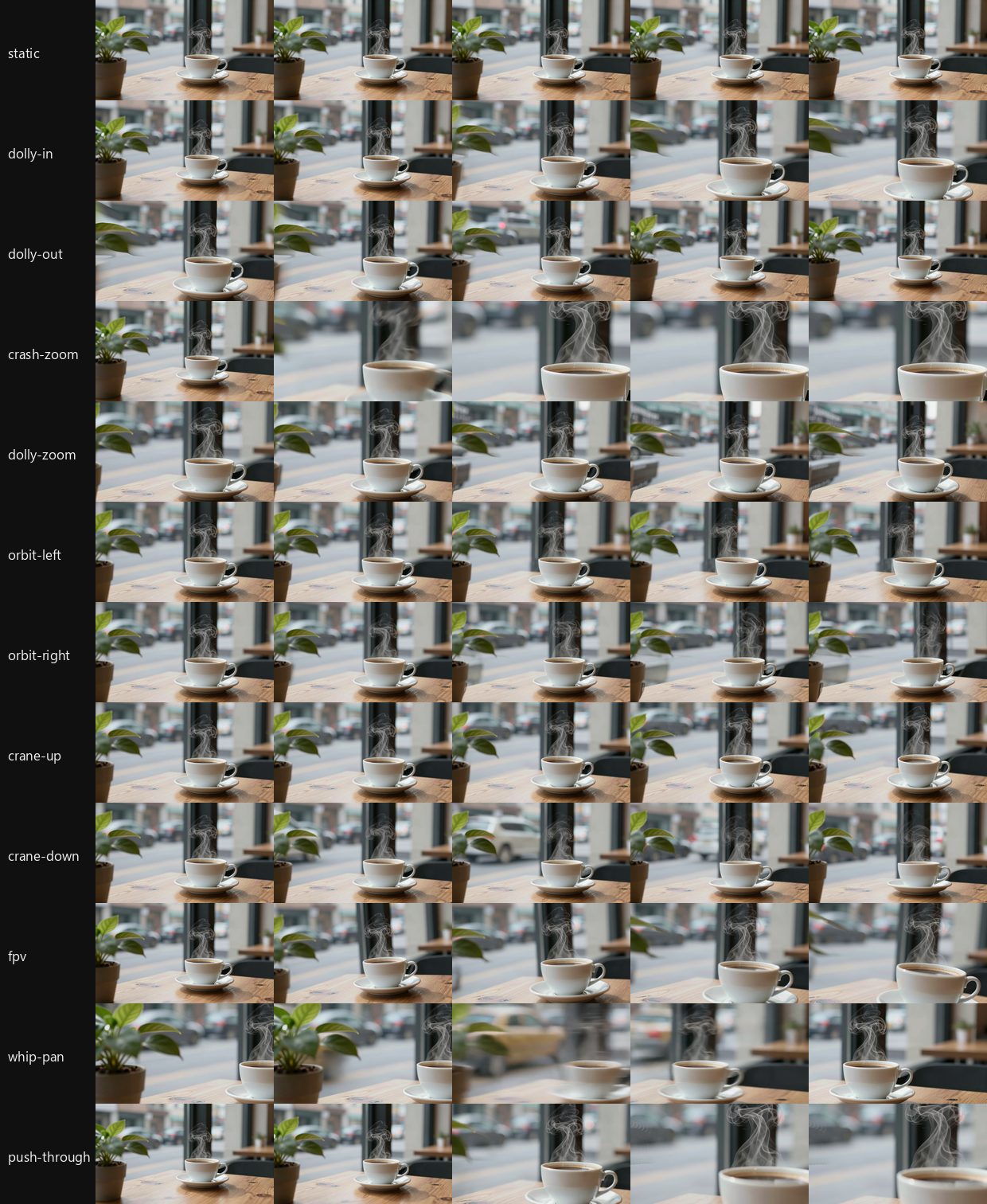
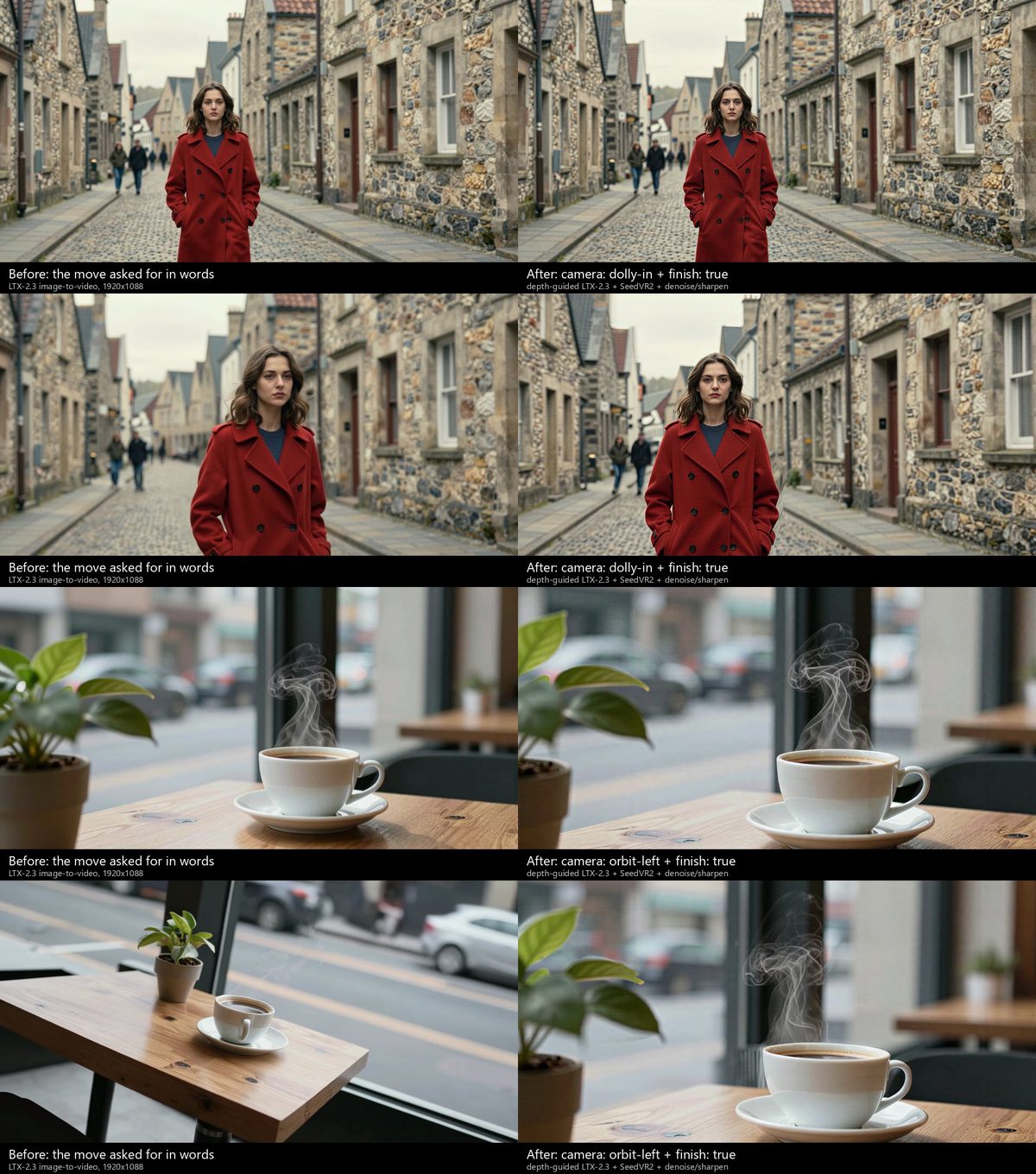
Two things the tests changed in the recipes. The subject's depth is the pivot (at, else the subjects mask, else the
nearer things in the middle of the picture): pivoting on the centre, which is often the background, made the subject
slide. And moves that open gaps behind near things pin the pure-camera render lightly (anchor 0.3 by default for orbit,
crane, dolly-zoom, fpv and push-through, against 0.6): pinned at 0.6, LTX copied the render's stretched pixels in those
gaps; at 0.3 (or 0) it repainted them with background that fits and still followed the move (orbit gain 1.06-1.09).
Rays that leave the picture see it mirrored rather than its edge pixel streaked.
Whether a beat reads as its move is measured on its frames, against the pure-camera render of the same rig
(engine/camera_moves.py move_agreement): dense optical flow of the generated frames against the render's, as a gain
(1 = the same motion, as much of it), a direction cosine, and a parallax cosine with each field's mean taken out (the
depth structure of the move: an orbit scores ~0 there if the model only slides the picture). A static shot is measured as
drift (pixels a frame) instead.
Edit only inside a region (edit.region)
A plain image edit (Qwen-Image-Edit) redraws a little of everything: ask for richer shoes and the crowd around them
shifts too, so two versions of the same frame shimmer when one dissolves into the other. With region the edit may
change only part of the picture; everywhere else the result is the source image, pixel for pixel. A landing page
can freeze a frame of a crowd, let the camera visit one person's shoes and then their hands, and have each come into
more detail and colour while the rest of the frame stays exactly as it was:
image:
  edit:
    source: { beat_frame: { beat: walk, at: last } }
    instruction: "Redraw her shoes in rich detail: worn leather, laces, stitching, deep brown. Keep the drawing style."
    region: { prompt: "the girl's shoes", pick: largest, grow: 12, feather: 8 }    # or  region: "the girl's shoes"
    seed: 3
Chain edits like any others, each region found on the previous result: shoes, then region: "her hands" with the shoes
edit as its source, then the whole girl. Outside each region the pixels equal that step's own source.
How it works. (1) Find: Florence-2 turns prompt into boxes on the source (pick, within and the "X's Y" owner
test work as in reveal; or give box / points in 0-1 picture coordinates, negative_points for what to leave out),
and SAM 2.1 cuts a precise mask at the source's resolution. (2) Shape: grow widens the mask (pixels of the source;
the edit may redraw that much beyond the thing itself, which helps it blend), feather softens its edge, invert: true
edits everything except the region. (3) Edit: by default the editor is shown a padded crop around the region
(context: how much surrounding, as a share of the region's size, 0.6 by default) rather than the whole picture. The
editor works at a fixed size (about 1.6 megapixels), so a small region in a big picture gets several times the pixels a
whole-image pass would give it, and that is where real detail comes from; the surroundings in the crop keep its colour
and style consistent. scope: image shows it the whole picture (always used with invert). (4) Composite: the
result is blended back through the feathered mask with integer arithmetic at the source's own size, so where the mask
is 0 the output pixel is the source pixel. Colour and tone at the seam are the edit's job (say what colour and light
you want in instruction); the feather only hides the join.
The mask is kept beside the image: .build/_generated/edit_<digest>.mask.png (the exact compositing weight), plus an
.outline.png overlay for review and region_<digest>.boxes.jpg (the boxes Florence-2 found, drawn on the source).
studio storyboard draws the outline on a card whose image is a region edit, and the edit workspace (--edit) shows it
over the image (a region button switches it off) with the region's prompt, pick, grow and feather as fields;
a region given as a bare string becomes a mapping when you edit its other fields. Cache: the region is part of the
edit's digest only when set, so nothing already rendered is redrawn. The region is found on each source once (it is
cached by the source's content and what names the region), so changing only seed, instruction, feather or grow
reuses it. ComfyUI needs the same nodes as reveal (studio setup-comfy).
Colour that follows the camera (reveal:)
Say you want a black-and-white crowd with a couple in it, and colour that comes into exactly the part the camera looks
at: her hand, then their shoes, then the two of them, while the crowd stays grey. Asking a video model to colour only
the hands colours the crowd, reframes and changes faces. So the film is rendered once, in full colour, and the
page reveals the colour region by region from tracked masks, in the browser, driven by scroll. Any film section can do
it (beats, a take, or your own video:), and any site can "bring the product into colour" as you scroll:
    reveal:
      base: mono              # what un-revealed pixels look like: mono, dim, blur, or a tint colour such as "#2a4a6a"
      regions:
        - { id: her_hand, prompt: "the woman's hand", pick: left, at: { beat: hands, t: 0.5 } }
        - { id: shoes,    prompt: "the shoes of the woman and the man", at: { beat: feet, t: 0.5 } }
        - { id: couple,   prompt: "the woman in the long coat and the man in the jacket", at: { beat: walk, t: 0 } }
      keys:                   # scroll progress of the section (0-1) -> how revealed each region is (0-1), eased
        - { at: 0.40, her_hand: 0 }
        - { at: 0.48, her_hand: 1 }
        - { at: 0.55, shoes: 0 }
        - { at: 0.62, shoes: 1 }
        - { at: 0.70, couple: 0 }
        - { at: 0.80, couple: 1 }
      feather: 6              # mask edge softness, px at film size
How it works: each region is described (prompt, found on its at frame by Florence-2) or pointed at (points,
box, in 0-1 picture coordinates), then followed through the film by SAM 2.1's video predictor, forwards and
backwards from that frame, inside its shot (a cut ends a track: tracking never runs across one, so a region
shows only in shots where it has an at; give it one at per shot it must show in: at: [{beat: walk, t: 0}, {beat:
seen, t: 0.5}]; a non-beats film's cuts are found by scene detection, or listed in reveal.cuts). The masks are packed
(up to four per video) into grayscale videos with the film's own frame rate, frame count and keyframe interval, and the
page draws each frame of the film through a small WebGL2 shader: the base look everywhere, colour where mask x reveal
amount, a film frame and its mask frames always from the same frame number (a seek goes to both videos and the canvas is
drawn only when both have landed). Without WebGL2 the colour film plays as it is; with reduced motion each region jumps
to colour as its moment arrives; phones get half-size masks and a 1280-wide canvas.
A prompt that matches several things (both hands) reveals all of them unless you narrow it: pick: (first,
largest, smallest, left, right, top, bottom, or an index), within: "the woman in the long coat", or a
prompt shaped "the X's Y" / "the Y of the X", which does that by itself; for the awkward cases give points. Each
region leaves ground.jpg (the boxes it found) beside its masks in .build/<section>/reveal/<id>/. grow: widens or
shrinks a finished mask in pixels; tracker: base_plus uses the smaller SAM 2.1.
Everything is cached per region: the film, the prompt, its frame and the model are its key, so editing keys:,
feather or base re-packs in seconds and re-tracks nothing. The storyboard draws every shot the way the page will
show it (base look; with masks from a full build, the colour at that moment), and the animatic is cut from those frames.
It runs on ComfyUI with studio setup-comfy (below) and about 2 GB of models.
The visitor's pointer reveals the picture (pointer:)
The visitor's pointer does the revealing. A lens is a soft circle under the pointer that shows a second layer through
the first: the picture's own colour through a black-and-white page, or a second picture of the same view (before and
after, the drawing under the paint, the inside of a product through its outside). A light is a torch: the picture
goes dark and a pool of warm light follows the pointer. Add it to a parallax or film section:
- id: after-hours
  type: parallax
  layout: split
  pointer: { mode: light, rest: [0.45, 0.3] }          # a torch on the photo; it falls off with the photo's depth
  steps:
    - { title: "Hold a torch <em>to her.</em>", image: inputs/painting.jpg }
- id: value-first
  type: parallax
  layout: split
  pointer: { mode: lens, layer: colour, base: mono, radius: 0.22 }    # colour through a black-and-white photo
  steps:
    - { title: "Under every colour, <em>a value.</em>", image: inputs/painting.jpg }
- id: renovation
  type: parallax
  pointer: { mode: lens, layer: [inputs/kitchen-before.jpg, inputs/hall-before.jpg] }   # one second picture per photo
  steps:
    - { title: "The kitchen, <em>then and now.</em>", image: inputs/kitchen-after.jpg }
    - { title: "The hall.", image: inputs/hall-after.jpg }
- The fields.
mode(lensorlight);layer(lens:colour, a second picture as any image input, or a list with one per photo in step order; a photo without one has no lens);base(the look outside a lens:mono,dim,blur, a hex tint ornone; by default mono for a colour lens, the photo as it is for a second picture);radius(a share of the picture's shorter side, 0.2 for a lens and 0.32 for a light by default);softness(the edge, 0-1);strength(lens: how fully the layer shows; light: how dark the rest of the picture is, 0.85 by default);color(the light's colour, a warm torch by default);rest(where it sits when no pointer is on the picture). - How the lens is drawn. In the scene's own WebGL pass, so it costs one extra texture read: the second picture is
sampled through the same 2.5D camera move and depth warp as the photo, so it stays lined up while the camera moves,
and a hairline rim marks the circle where the two layers look alike. The builder crops and resizes each second picture
to its photo's exact size (a log line says when the shapes differed). On a film the lens shows the film's own colour
through
base(or through the film'sreveal.base, alongside its tracked regions); a second picture needs a parallax section, since a still cannot follow a moving film. - How the light is drawn. In 2D, from the picture: everything is darkened, and a pool of light with a soft edge and a dim spill follows the pointer. On a photo the depth map shades it: farther surfaces get less light, and the slope of the surface (the depth map's gradient, read a little blurred so it follows big shapes) turns it towards or away from a lamp held just in front of the picture, so the light rakes across a face or a fold. On a film, which has no depth map on the page, it is a plain warm pool. This is not relighting: there is no G-buffer or 3D render behind it, so shadows are not cast and nothing behind a shape is lit.
- Phones. With no hover, the lens or light follows the finger while it touches the screen, sitting a radius above it so
the finger does not cover it, and glides back to
restwhen the finger lifts; with nothing touching it drifts slowly aroundrestso the page hints that it can be touched. - Reduced motion, keyboards, no WebGL. With
prefers-reduced-motionit stays atrest, still: the static version of the reveal. Keyboard users get that same static version (it moves only under a mouse or a finger). It is purely visual: the words never depend on it. Without WebGL2 the scene shows as it always did. - Cost. It redraws only when the pointer (or the scroll) moves: a still pointer costs nothing, and a section off screen is not drawn at all. Moving, it adds one texture read per pixel (lens) or five (light) to the scene's pass; the example draws at a steady 60 fps while the pointer moves.
- Recording it. A plain scroll-through never moves the mouse, so the lens sits at
rest.studio record my-site --pointer wandermoves it on a slow tour of the frame while it scrolls (or--pointer "0.3,0.5 0.7,0.4 ...": waypoints in 0-1 of the viewport, passed on a smooth curve over the recording), with real mouse events the page follows, and draws a small ring where the pointer is (--no-cursorleaves it out).
Example: Atelier Sfumato (both modes on the Mona Lisa, buildable on a laptop: the painting is in the project and the depth model runs on the CPU).
Cinemagraphs: one thing moves (cinemagraph:)
A still where only one thing moves (steam above a cup, a curtain in a breeze, light on water, a candle flame, smoke) and
everything else is held perfectly still. Calm, premium, and very hard to do by hand: the moving part has to loop without
a seam and the rest must not move at all. Put cinemagraph: on any image input, wherever the page shows an image
(hero.image, a product or strip image, a gallery tile, a section's backdrop):
image:
  generate: A white cup of black coffee by a window, a thin plume of steam rising, soft morning light
  cinemagraph:
    moves: the steam rising from the coffee cup     # what moves, as you would say it; it must be visible in the still
    motion: slowly curling upward and thinning out  # how (optional)
    seconds: 4
    loop: seamless                                  # or pingpong
    strength: 1.0                                   # 0.2-1.5: how far it moves
studio build makes them with the page; studio cinemagraph <project> builds just those and prints a measured report for
each (--list shows what is built, --check measures the built page in Chrome); the MCP tool is cinemagraphs. A plain
image (no cinemagraph:) is untouched and keeps its cache; so does the still under a cinemagraph, which stays the picture
(its own cache keys never change, films that use it do not re-render). Stages, each cached by its own key, in
.build/_cinemagraph/<id>/:
- Region.
movesis found on the still (Florence-2 grounding, SAM 2.1: the same cached stageedit.regionuses; or givebox,points,negative_points,pick). The video model is shown a crop around it (plus half again its size of surroundings, the wayedit.regionshows the editor a crop), so the moving part gets the model's full resolution. - Clip. LTX-2.3 or Wan 2.2 image-to-video (
model:, else the site'svideo_model) of that crop, told that onlymovesmoves and the camera is locked.loop: seamlessasks for the whole loop's length and closes it afterwards with a flow-aligned crossfade, which is right for what flows (steam, smoke, water, a flame: the same thing a moment later).pingpongasks for half, keeps the way out, and plays it forward then back (a loop with no seam by construction; for sways and shimmer that read the same both ways, not for steam, which would fall). The way out is cut where the region has moved a set distance from its first frame (a video model's motion grows: the first second is a gentle sway, the third a curtain flying across the room) and played slower to fill the loop. Tried and dropped: generating "first = last frame" (the end frame pinned to the still) does not make a loop on either model: LTX-2.3 returns a clip that hardly moves, a loosened pin lets the middle go wild, and Wan 2.2 invents an action to get from the still back to itself (a hand throws a sheet across the window). Kept lossless, so everything after it can be redone without the GPU. - Prep. A video model moves the camera however it is told not to (a push in, a drift, a dolly's parallax) and a cinemagraph's whole point is that nothing but one thing moves. Each frame is pinned back to the still by dense optical flow measured on the pixels around the moving part and carried inward across it (flow stabilisation: on a test clip that pushed in by 78 px the held picture went from 61 levels away from the still to about 5). The clip is then cut where the picture around the moving part starts to change anyway (what is left is real change), and, for a pingpong, where the region has moved far enough for one swing; the kept frames are played slower (flow-interpolated, at most 2x) to fill the loop.
- Track and mask. SAM 2.1 follows the moving thing through the clip (
track: falseskips it). The mask is the region, the path it sweeps and every part of the clip that really moves and is joined to it (a curtain's hem lifts, steam climbs past the box it was found in), grown (grow) and feathered (feather): the video is used where something moves and the still everywhere else, and the soft edge falls on pixels that do not move, so no seam is cut through the motion. A patch that moves but is not joined to the thing (a car outside the window) stays the still. - Encode. The frames are tone-matched to the still around the mask (a video model returns a picture a shade off the
one it was given), the loop is closed (a flow-aligned crossfade where a generated clip does not meet itself; a
pingpong has no seam), the motion is damped or exaggerated by
strength, and the part that moves is encoded as a small H.264 video (only the crop around it, never the whole picture) with the mask as a lossless WebP. A review sheet (cine_<id>.sheet.jpg: the still with the mask's edge, the mask, six frames as the page composes them, and a heat map of what changes) is written beside it: read it.
On the page the still stays in the HTML (<img> or the section's background); runtime/src/lib/cinemagraph.ts lays the
video over it through the mask (a CSS mask), so where the mask is 0 the pixels are the still's own and cannot change.
It loads a screen before it is needed, plays only while in view and in a visible tab, and never starts under
prefers-reduced-motion, data saver or a 2G connection (the still is the page), or where CSS masks are unsupported. It
never touches layout (an absolutely positioned layer beside the image) and follows the image's own transform (a hero's slow
zoom). It works in every style whose markup shows the image as an <img> or a backdrop; a style that repaints images
itself (a halftone, a canvas) shows the still.
The report (cine_<id>.json, and printed) measures what matters: the loop's seam (the step from last frame to first
against the steps beside it: about 1.0 is a continuous loop, over about 1.5 is a visible jump), how much of the picture
moves, what is held (the largest change of any pixel where the mask is zero, in what the page composes: 0), and
bytes. studio cinemagraph --check does the same on the built page in Chrome on the GPU: screenshots of the box over a
loop, the change outside the mask (must be 0), the motion under it, the video's frame times across the loop's wrap, and
reduced motion (no video is loaded). Parallax scenes (a WebGL depth shader) show the still; a cinemagraph there is not
built.
How it reads, honestly (Tern House, examples/tern-house, measured by studio cinemagraph --check in Chrome on the GPU,
and by looking). What held: in every one of the six, the pixels outside the mask never changed in the browser (the largest
change of any pixel outside the mask was 0, and 1 level on under 0.01% of a hero's pixels with its scroll zoom); loops show no
hitch at the wrap (the wrap frame is presented no later than the slowest frame elsewhere); reduced motion loads no video and
shows the still; a phone keeps the moving part in view (the runtime slides the crop of a cover photo toward it); the whole
page carries 1.4 MB of video. What reads as a cinemagraph: the steam above the cup (5% of the picture moves, a slow curl, the
cup, the croissant and the window exactly as photographed) is the best of them; the curtain (18%) is a calm sway, only the
cloth moves; the incense smoke is gentle. What does not yet: the candle flame barely flickers (the video models animate a
flame by a few levels, and strength can only exaggerate what is there), so it reads as a still with a faint pulse; the
pool and the estuary (18% and 29% of the picture: a whole body of water shimmering) sit nearer to a looped video than to a
cinemagraph, which is the honest limit of the idea: the smaller the share that moves, the more it reads as a still that
breathes. Things that do not work and are not hidden: first = last frame generation (see Clip above); a pingpong of steam
(it would fall); moves that names half the picture (refused: the build stops and asks for pick, box or points); styles
that repaint their images (the halftone style renders them on a canvas, so the still is shown); the page checker is only
meaningful on pages whose own furniture does not move over the picture (a style with an animated gauge in the box moves
pixels the cinemagraph is not responsible for). Frame pacing: the video work is off the main thread (the scroll loop spends
about 0.3 ms a frame more with six cinemagraphs on the page), but measured on this machine while another process held the GPU at
100% (ComfyUI rendering for other jobs) scrolling a page with playing cinemagraphs dropped about 15% of frames to 30 fps
against 0-2% with them off; that run is a worst case and should be repeated on an idle GPU before a claim is made.
Living details: one small thing alive (live:)
The lighter cousin of a cinemagraph: one small thing alive in a still illustration or photograph, drawn by the page itself,
so nothing renders at build time and it works on a laptop with no GPU. Put live: on a hero, product, strip or gallery
image, a section backdrop, or a parallax step's photo (up to four details per picture):
image:
  file: inputs/hero.jpg
  live:
    - { kind: drift, box: [0.315, 0.255, 0.55, 0.44], softness: 0.1, speed: 0.8 }   # a cloud, with room around it
    - { kind: glint, box: [0.72, 0.0, 1.0, 0.33], count: 8 }                        # twinkles in the sky
| Kind | What the page draws |
|---|---|
sweep |
A soft band of light slides across the region along angle, once every 7 s (at speed: 1), dark between passes. With origin (0-1 of the region, may lie outside it) it is a beam turning round that point instead, once every 9 s. |
glint |
count small four-pointed twinkles, each swelling and fading over about a second, staggered. They sit on the region's brightest small points, found at build time on the picture as shown (a speck brighter than what is around it), so they land on printed specks, stars or highlights and not on flat colour; a flat region spreads them evenly. |
drift |
The region slides slowly to and fro along angle (16 s round, up to 0.035 picture heights at strength: 1) inside its soft edge. Give the box room around the thing: anything whose edge falls in the box's soft edge shows faintly twice. |
rise |
Soft specks rise through the region, sway a little, flicker, and fade in from the bottom and out before the top (embers, bubbles, dust in a beam). count sets about how many. |
flow |
A gentle wavy displacement with a faint shimmer: ripples that run along angle (water). |
Each detail takes speed (0.1-4, 1 is calm), strength (0.05-1: brightness for the lights, distance for drift, ripple for
flow), softness (the soft edge, a share of the box) and color (sweep, glint, rise): a theme token (light, dark,
accent, accent2, ink, bg, bg2) or hex, resolved against the site's colours at build time. By default sweeps and
glints use light (the lighter of the text and background colours) and rise uses accent2.
The region is a box (x0, y0, x1, y1 in 0-1 of the picture), or a prompt ("the clouds", with pick) found by the
same tooling as edit.region (Florence-2 + SAM 2.1 through ComfyUI, cached): the box becomes the found shape's extent and
the page gets a small soft mask of it, so a drift moves the thing itself and the sky closes behind it. Without ComfyUI (and
while planning or in a storyboard, which only use an already-found region) a detail falls back to its box, or is left out
with a note when it has none.
On the page. On a parallax photo the details are drawn inside the photo's own WebGL pass, on the photo's coordinates, so
they follow the camera move and sit under type in the world; the module is loaded only when a chapter has details. On a plain
picture the compiler marks the <img> (or the backdrop's element) with data-live, and runtime/src/players/liveStill.ts
lays one WebGL canvas over it that redraws the picture only inside the regions (alpha everywhere else, so outside them the
page shows the <img> itself), copying the image's own transform (a hero's slow zoom). Both draw at 30 frames a second
only while the picture is on screen and the tab is visible; off screen nothing runs. With reduced motion, without WebGL2, or
for a fit the layer does not know, nothing is drawn: the still picture. A page without live: builds exactly as it
did, and the picture under it keeps its cache. examples/kitewell has it on its hero: two clouds drifting and the sky
twinkling.
Not here yet: a GPU path that renders drift or flow as a seamless video loop through the cinemagraph pipeline (use
cinemagraph: for motion the page cannot draw, such as steam or a flame); regions are boxes or found masks, not tracked
through a film.
Type in the world (place:)
A headline over a film is a caption: it floats on the glass, and the picture goes on behind it. Type in the world puts the
headline in the picture, where the picture's own things can pass in front of it, light it, wear it. Any step of a film
or a sequence (layout: overlay, with an at window or pinned to a beat) or of a parallax section takes a place object;
its title is the text, in the site's fonts, with the <em> words set as everywhere else:
    steps:
      - title: Down to <em>the water.</em>
        at: [0.44, 0.58]
        place: { kind: behind, at: "the spruce tree", x: 0.5, y: 0.3, size: 0.62 }     # set just behind the spruce
      - title: Stay <em>cold.</em>
        at: [0.58, 0.7]
        place: { kind: surface, at: "the wooden deck floor", x: 0.34, y: 0.84, size: 0.44 }   # painted on the deck
      - title: Still cold <em>at noon.</em>
        at: [0.86, 0.99]
        place: { kind: sky, y: 0.24, size: 0.7, caps: true, track: 0.12 }              # in the haze, fog in front
kind |
What it is | at |
|---|---|---|
behind |
The title has a depth. Whatever is nearer (a pine, a railing, a building, a person) passes in front of it as the camera moves; the title follows the layer it sits in, so it moves less than a nearer one, and it is as soft as the footage is at that depth. | a prompt for the thing it sits just behind (found on the anchor frame by Florence-2 + SAM 2.1; gap: is how far behind), or a depth from 0 (far) to 1 (near) in the shot's own range; default: behind the nearest third of what is in its box |
surface |
Painted on a wall, a sign or a floor. The surface is found by prompt and followed through its shot (SAM 2.1, the same stages as reveal), the plane's slant comes from the depth map, and the letters are carried with it in perspective. The surface's light, grain and relief show through the paint (relief), the grain ragged-edges each letter, it wears (wear), and it is laid on from left to right as the step arrives. Whatever stands in front of the surface covers the paint. |
a prompt naming the surface (quad: gives its four corners instead) |
sky |
Large type at far depth, mixed with the air (haze) with a fog in front (fog, thicker low in the picture and over far things that stand in front of it): a far ridge covers the bottom of the letters. |
a depth (default 0.07) |
x, y and size place it on the frame (the width of the type as a fraction of the frame's width); lines, align,
caps, track, weight and color (auto reads the footage and takes the theme's lighter or darker ink; or ink,
paper, accent, a hex) set the typography; anchor: picks the frame the thing is found on (default: the middle of
the step's window); follow: how much of the camera's motion the type follows; slant: how much of a surface's estimated slant
is used (the estimate is a guess from relative depth: 1 as estimated, 0 flat to the screen). The JSON schema carries a description
of every field, so the Studio UI and Claude's MCP tools show them.
How it works, in short. Per film the engine makes a depth video: Depth Anything V2 on every frame is sharp but
breathes (each frame is normalised alone) and its edges shimmer, so each frame's map is fitted to the one before it
(carried by optical flow, a robust scale and shift), blended where the flow is trustworthy, snapped to the picture's edges
with a guided filter, and restarted at every cut. Each title is tracked: pyramidal Lucas-Kanade from keyframes inside
the patch it follows (the layer at its depth; the far layers; the surface's mask), a similarity for a layer and a
homography for a surface, smoothed with a local cubic so the camera's speed-ups survive and the noise does not. The depth
and the surfaces' masks are packed into one grayscale atlas video with the film's frame rate, frame count and keyframe
interval (a half-size copy for phones). The page draws the film itself in WebGL2: the title is typeset onto an atlas
texture and found per pixel through a matrix per frame; it shows where the scene is farther than the title (a soft step in
depth), is lit by the light at that spot, mixed with the air there, defocused like the footage at that depth, and carries
the picture's grain. The film and the atlas are seeked together and drawn only when both have landed. A parallax photo does
the same from its own depth map, with no tracking (the 2.5D camera moves the picture, the type goes with it). A
sequence (a rendered product on a clear backdrop) needs no model at all: the frames' own alpha is the silhouette, so a
headline set behind the product is cut exactly along its edge, and it stays where it is on the screen while the product
turns; the frames are also encoded as a film for the world player, and without it the frames play as always.
Fallbacks: with reduced motion, without WebGL2, with reveal on the same film, and where a title would be cropped off a
narrow screen (a phone held upright) or be too small to read, the title is an ordinary overlay caption; it stays in the
page as text, visually hidden, while the world draws it. Cached per stage (world_depth once per film, world_text_<i>
per title, world_pack); a film with no in-world type keeps its cache. depth_model on the section picks the Depth
Anything size (small is Apache-2.0; base and large are sharper but CC-BY-NC).
studio world my-site [--section story] # each title's box on the film's own frames, the depth beside them, what to change
studio world writes .build/<section>/world/sheet.jpg and report.json for a built film: the box is carried through
the same per-frame matrices the page reads, from the first frame the title is shown to the last, and the report says how
steady the track is (the box's distance from its own smoothed path, in pixels of the 960-wide working frame), how much of
the window the type is on screen, how steeply a surface slants and, where something is off, what to change (anchor,
follow, at, y, quad). Examples: type in the world (the one-take world with
all three placements) and on photographs (Casa Alta).
Honest limits. The depth is relative, so at: 0.4 means 40% of that shot's own range; naming the thing
(at: "the spruce") is more reliable. A surface seen almost edge-on (a floor under a level camera) gives slivers of
letters; put the type lower in the frame or on a more frontal surface, and studio world says so above 80 degrees.
Generated depth is soft where the footage is soft (hair, mist, thin branches) and the occlusion follows it. A layer with
nothing to track (clear sky, a plain backdrop) holds still. The type follows what is at or behind its depth, so people
walking in front of it do not drag it, but a billboard that plays video or a crowd that fills the layer makes the track
wander: studio world measures it, and follow: 0 pins the type to the screen. A surface mask that is not one plane in
the depth map (a person leaning on the wall) falls back to type laid flat to the screen, with a note in the build log; slant
tames the estimate and quad replaces it. A surface type is only as long-lived as the surface is on screen: a floor the
camera flies over carries its paint out of the bottom of the frame in about a second and a half. In-world type is not
drawn through reveal's shader yet (such a film keeps its titles as captions, and says so in the build log).
One place, dawn to night (type: light)
A section that is one place and a whole day. The scene takes a single picture of the place (a photo, a generated image, or another scene's still) and relights it into each time of day with the geometry locked; scroll then moves continuously through the day instead of cross-fading a slideshow. Each step of the section sits at a time of day, and the section's own colours (ink, accent, the shade behind the text) follow the sky.
- id: day
  type: light
  world:
    generate: "wide photograph of a small stone harbour town around a calm bay ..., even daylight, no people"
  world_time: noon                       # the world picture IS noon: used as it is, the anchor everything is measured against
  times: [dawn, morning, noon, golden-hour, blue-hour, night]     # presets, or free text ("low green storm light")
  lamps: [{ prompt: the street lamps and the lit windows }]       # what switches on: cut out with Florence-2 + SAM 2.1
  steps:                                 # the sections of the day, in order (or pin one: state: { time: night })
    - { kicker: "Quay House", title: "The harbour <em>wakes first.</em>", intro: true }
    - { kicker: "Morning",    title: "Coffee on the quay, <em>before anyone.</em>" }
    - ...
Build (one cached stage per time: world, depth, sky, time_<id>, maps, web; an unchanged spec rebuilds nothing,
and changing one time's words redoes that time only). Each time is the world relit by Qwen-Image-Edit with an instruction that
changes only the light (engine/light_presets.py: dawn, sunrise, morning, noon, afternoon, golden-hour, sunset, blue-hour, night,
overcast, storm; a time can also be free text, or image: a picture of your own). The geometry lock has three parts, because an
editor left to itself redraws the place (measured here: 11 to 16 px of drift at 1024 across, windows and houses reshaped):
1. Start from the world. The edit samples from the picture's own latent (structure.strength, the denoise strength, 0.88
by default), so the layout is held: 0.75 moves things about 1 px, 0.88 a few, 1.0 (from noise) 11 to 16 px.
2. Measure, undo the global move, retry. Structure is compared in a light-invariant way (band-passed log luminance,
locally normalised); dense optical flow gives the displacement, and drift is how far things are from where they were, in px at
1024 across. What the editor does to a place is mostly a global zoom and shift; a robust affine fit undoes it and bends nothing
(structure.align: affine; flow also pulls local structure in, which matches edges better but makes lines wobble; none
measures only). A relight still over structure.max_drift is redone with another seed (retries) and the best kept.
structure.chain relights each time from its neighbour nearer the world's time instead of the world, so neighbours agree more.
On the Quay House example (six times, seed 7 base): the editor moved the place 5 to 24 px (mean, at 1024 across) and left
0.0 to 4.4 px after its global move was undone; edge agreement went from 0.40-0.69 to 0.70-0.86 (what stays under 1.0 is the
light itself changing which edges exist at night). Night needed strength: 0.96 to get dark; at 0.88 it stays a moonlit dusk.
3. Glide over what is left. Between neighbouring times the build writes a flow texture of the structure that still differs;
the page glides along it as the light changes, so edges slide into place instead of cross-fading doubled.
Between neighbouring times the build also writes the low-frequency light-change field (edge-aware, log-encoded) and a map of the
lights that turn on or off (small bright features that the change of ambient light cannot explain, each with its own delay and a
halo; lamps: confines them to regions named with Florence-2 and SAM 2.1). studio light <project> reports drift, edge
agreement and glide per time and pair.
Play (runtime/src/players/light.ts, WebGL2): scroll maps to a time of day with a hold at each step (hold) so a headline
reads in its own light and the change passes between headlines. Between two times the shader carries the light's low-frequency
change across both pictures (so nothing dips to grey half-way), switches the rest (shadows, lit and unlit surfaces) with a front
of new light that spreads from where it arrives, reaching the sky first and the near ground last, brings windows and lamps on one
by one with a halo, draws the times' haze as mist that thickens with distance and drifts, and breathes the place with a slow
2.5D drift through the world's depth map (drift). Optionally a sun and moon glow travels over the sky (sun). A clock and sun arc
in the corner show the hour. Phones get a smaller picture set and a focus crop; prefers-reduced-motion gets one still per step
(no drift, no blending); without WebGL the stills are plain images, one per step. Scrolling is never captured: it is the
page's own scroll.
studio light <project> [--section day] builds the section and writes light/<id>/: sheet.jpg (every time with its measured
drift), strip_*.jpg (the built page across each transition, at the scroll positions a viewer passes through) and light.json.
studio light --presets lists the named times. Example: Quay House.
One subject, state by state (type: stages)
Show a thing being made, or changing, by scrolling through its states: a drawing becoming the object, a room before and
after, a product through each step of its making. A stages scene is a sequence of stills of exactly the same view; the
scroll holds on each state while its step is read and reveals the next one over it between steps, so every state lines up
with the one before.
- id: making
  type: stages
  layout: overlay
  shade: none
  fit: { fit: contain, position: [1, 0.5], zoom: 0.9 }     # the whole picture, against the right edge
  phone: { fit: contain, position: [0.5, 1] }              # on a phone: whole, below the words
  stages:
    - { id: drawn, image: inputs/stage-drawing.png }
    - id: cut
      image: inputs/stage-cut.png
      reveal: { kind: wipe, angle: 90, front: { color: accent, width: 0.012, where: all } }   # a scan line, top to bottom
    - id: assembled
      image: inputs/stage-assembled.png
      reveal: { kind: map, map: inputs/order.png, softness: 0.03, front: { color: accent2 } } # parts land one by one
    - { id: done, image: inputs/stage-finished.png, reveal: fade }
  pointer: { mode: lens, layer: inputs/inside.png }        # on the last stage: a lens onto a second picture
  steps:
    - { title: "First, <em>a drawing.</em>", intro: true, state: { stage: drawn } }
    - { title: "Cut to shape.", state: { stage: cut }, at: { grid: "1 / span 4", row: middle } }
    - { title: "Every part <em>in its place.</em>", state: { stage: assembled } }
    - { title: "Finished.", state: { stage: done } }
- Stages. Each
imageis any image input; every stage is fitted to the first stage's size (the build says when a shape differs, since the states only line up when they are the same view). The strongest way to get aligned stages is to make them from one picture: generate or photograph the finished thing once, then derive the earlier states from it (parts masked out and filled, a line drawing traced from it) rather than asking an image editor for each one, which moves things. - Reveals.
fade(the whole picture at once),wipe(a straight front alongangle: 0 left to right, 90 top to bottom) ormap(a greyscale picture of the same view: each pixel arrives when the scroll reaches its grey, black first, so flat greys make whole parts land together, in any order you paint).softnessis the front's soft edge, a share of its travel. - A band of light on the front (
front): a scanning head, a band of heat, a sweep of light, drawn where the front is, so it moves exactly with the scroll.coloris a theme role or a hex colour,widthandstrengthits size and brightness, andwhere: changelights it only where the picture changes between the two stages (each part lights up as it lands) orwhere: allacross the whole subject (not the stage's background around it). - Timing. Steps sit at stages with
state: {stage: <id or index>}, or spread over them in order. The picture holds still for the middleholdshare of each step's stretch, and overlay captions are timed to be on screen while it does.length0 is 2.2 screen heights per stage. - Framing.
fitandphone(fit: cover | contain,position,zoom): cover fills the stage and keepspositionof the picture in view; contain shows the whole picture placed atpositionin the stage, the page's background around it. A phone sets every caption near the top, sophone: {fit: contain, position: [0.5, 1]}keeps the whole subject in view below the words.driftis a slow push-in over the scene and an idle breath. - Pointer.
pointerworks as on a parallax photo, and shows as the sequence arrives at its last stage; a lens's second picture is one picture of the same view (an X-ray, a cutaway). Itsrestis a point of the picture, so it stays on the subject whatever the framing. - Reduced motion and no WebGL: one still per step. Everything is built on the CPU (no GPU needed).
Faces, repaired (faces: restore)
Generated video bends faces. faces: restore on a film or on a beat repairs them after generation: faces above
min_size pixels are found in every frame (RetinaFace), restored with GFPGAN v1.4 (Apache-2.0; CodeFormer is left out,
its licence is non-commercial), blended back through a soft face mask, and the change is smoothed over time in the
face's own aligned space so it never flickers. Off by default, cached by the clip and the settings:
    beats:
      - { id: walk, prompt: ..., motion: ..., faces: restore }                              # this beat
    faces: { strength: 0.7, min_size: 96, smooth: 0.6 }                                    # or the whole film
About 0.7 s per frame of 1080p on an RTX 4090 with two faces in view. studio setup-comfy installs the nodes and
weights.
Find the polish problems before the owner does (studio inspect)
A finished film (beats, a take or any video:) is scored second by second and beat by beat, on the CPU, for the five
things people see without being able to say why, each measured so it can be said in a sentence:
| what it measures | how it reads | |
|---|---|---|
| Pops | a frame change that motion cannot explain, over a large part of the picture; a one-frame flicker; judder (motion updating under 12 times a second); and the dissolve between two beats that are meant to be one scene but do not line up (a double image, a colour change) | "Crossfade shoes to hands: at mid-fade 90% of the edges differ, so a double image shows" |
| Softness | how much fine detail the busiest parts of the frame hold (a frequency-domain index, so a soft-focus photograph is not mistaken for an upscale), with the edge width in pixels beside it | "only 2% of the fine detail of this film's sharpest frames is left here (edges 3.1 px wide), as if enlarged" |
| Halos | the share of clean edges with a bright rim or seam beside them, against the film's own usual share | "19% of the clean edges have a bright rim, 6.2x this film's usual 3%" |
| Style drift | how far the look moves from the scene's first second: the share of the picture's structure that is weak hatching or pencil texture (drawn styles), grain, and, within a still shot, tone, line density and saturation; --embed adds a CLIP image-embedding distance (local OpenCLIP weights only, nothing is downloaded) |
"66% of the structure is soft hatching, against 37% at the start of the scene (sketchier)" |
| Morphs | the share of the change between frames that optical flow cannot explain: things appearing, dissolving or rearranging instead of moving | "93% of the change is things rebuilding themselves rather than travelling" |
Beats that join like one scene (the two frames that meet look alike) are judged as a continuation; a join between frames
that look nothing alike is a scene change, a dissolve on purpose, and is never flagged. It writes
.build/inspect/<section>.json (the contract: per-beat scores 0-100, issues with a level, time span, reason and what to
try, a per-second timeline) and <section>.html: a timeline strip of every metric by second, the worst moments as
pictures (before and after, the dissolve's three frames, a 1:1 crop with the rim pixels marked) each with one line saying
what is wrong, and a score table per beat. Reports are cached by the film's content (a copy of a build is the same key;
an unchanged film answers at once), a rebuilt beat re-measures. The storyboard editor (studio storyboard --edit) shows a
badge on every beat card with its worst problem, linking to the report, and a Polish check button; MCP: inspect_film.
--video judges any video file as one shot, e.g. a studio record scroll-through.
The finishing pass (finish:)
A generated film comes out of the video model soft (a camera beat runs near 1024x576 and is scaled up), with grain that
shimmers from frame to frame. finish: on a film section runs a finishing pass over the finished film, after the join
and before the encode, each step its own cached stage keyed by the film and its settings:
  - id: story
    type: film
    beats: [...]
    finish: true                 # or { restore: 1088, batch: 21, denoise: 0.25, sharpen: 0.3, deflicker: false, interpolate: auto }
- Restore (
restore, default 1088;nullskips it): SeedVR2 7B sharp over the film at that height, in batches ofbatchframes (21 by default againstbeat_restore's 9: a batch is restored together, so larger batches shimmer less), chunked and cross-faded, colour kept by a Lab match. - Clean: FFmpeg
atadenoise(denoise, 0-1, default 0.25: a pixel is averaged with its neighbours in time only while it stays within a threshold of them, so the shimmer goes and real motion stays), then a light unsharp mask (sharpen, default 0.3) that gives back the fine detail the denoise softens.deflicker: trueadds FFmpeg's brightness deflicker for a clip that visibly pulses; it is off by default because on a moving camera it chases real changes of light (measured below). - Interpolate (
interpolate, off by default): twice the frame rate, for smoother slow scrolling. It uses ComfyUI's own FrameInterpolate node with a RIFE or FILM checkpoint in<ComfyUI>/models/frame_interpolation/(not installed by default;studio doctorsays whether one is there).autoruns only with such a checkpoint and only when the film's median motion is at mostslowpixels a frame (at 1920 wide), where interpolation is clean.onalways runs, with FFmpeg'sminterpolatewhen there is no checkpoint; measured, it leaves halos along moving edges (below), soautonever falls back to it.
studio build --plan prices each stage (SeedVR2 about 95 s per second of film at 1088, scaled by the square of the
height; the clean-up seconds). The restore works in overlapping chunks, and each chunk is kept by the frames it is made
of: change one shot and rebuild, and only the chunks whose frames changed are restored again (the log says how many
were kept); a shot whose length changes moves every chunk after it. Measured with studio inspect on the same clip
before and after:
| clip (LTX-2.3 camera beat, 1024x576 scaled to 1920x1088, 4 s) | fine detail | edge width | luma zigzag | inspect: softness / morphs / halos | verdict |
|---|---|---|---|---|---|
| walker, dolly-in: as generated | 0.000057 | 6.1 px | 0.225 | 0 / 96 / 100 | bad (soft) |
| ... SeedVR2 restore at 1088, batch 21 | 0.000294 | 5.8 px | 0.233 | 40 / 92 / 100 | visible |
... finish: true (restore + denoise 0.25 + sharpen 0.3) |
0.000418 | 5.7 px | 0.142 | 67 / 91 / 92 | clean |
| cup, orbit-left: as generated | 0.000065 | 5.8 px | 0.133 | 0 / 100 / 100 | bad (soft) |
| ... SeedVR2 restore at 1088, batch 21 | 0.000230 | 5.8 px | 0.138 | 50 / 100 / 100 | slight |
... finish: true |
0.000373 | 5.8 px | 0.036 | 88 / 100 / 100 | clean |
Fine detail is studio inspect's softness measure (higher is sharper; under 0.00025 reads as enlarged), the luma zigzag
is the mean size of a frame's brightness step that reverses at the next frame (the continuous form of inspect's flicker
check; lower is steadier). What did not help, on the same clips: deflicker after the restore raised the zigzag (0.233
to 0.360) and lost a fifth of the detail; giving SeedVR2 the clip at the video model's own 1024x576 (a real 2x upscale)
instead of at the film's size restored less (detail 0.000223, softness 21); FFmpeg minterpolate to 48 fps turned halos
from 100 to 43 (visible double edges along the moving plant). The edges stay wider than native 1080p footage (1.5-2.5 px):
the restore redraws texture, not the video model's resolution.
One subject across shots (subject:)
A film about one person or one product has to keep it the same from shot to shot. subject: names it once, with a
reference picture:
  - id: story
    type: film
    subject: { image: inputs/hero.png, name: the woman in the red coat }
    beats:
      - { id: street, prompt: "She stands on a cobblestone street, overcast light", motion: ..., camera: dolly-in }
      - { id: cafe, prompt: "She sits by a cafe window, morning light", motion: ..., camera: orbit-left }
Every generated beat without its own image then starts on a picture made from the reference by the local image editor
(Qwen-Image-Edit): the beat's prompt as the new scene, name kept exactly as in the reference (keep: what must not
change, by default face, hair, clothes, shape and colours). Inside each shot the video model starts on that picture and,
on a camera beat, is pinned to pure-camera renders of it along the way, so the subject keeps its identity through the
move. A beat with its own image, a frozen moment and a camera beat that continues the one before are unchanged; a new
reference file re-makes the start pictures of the beats that use it.
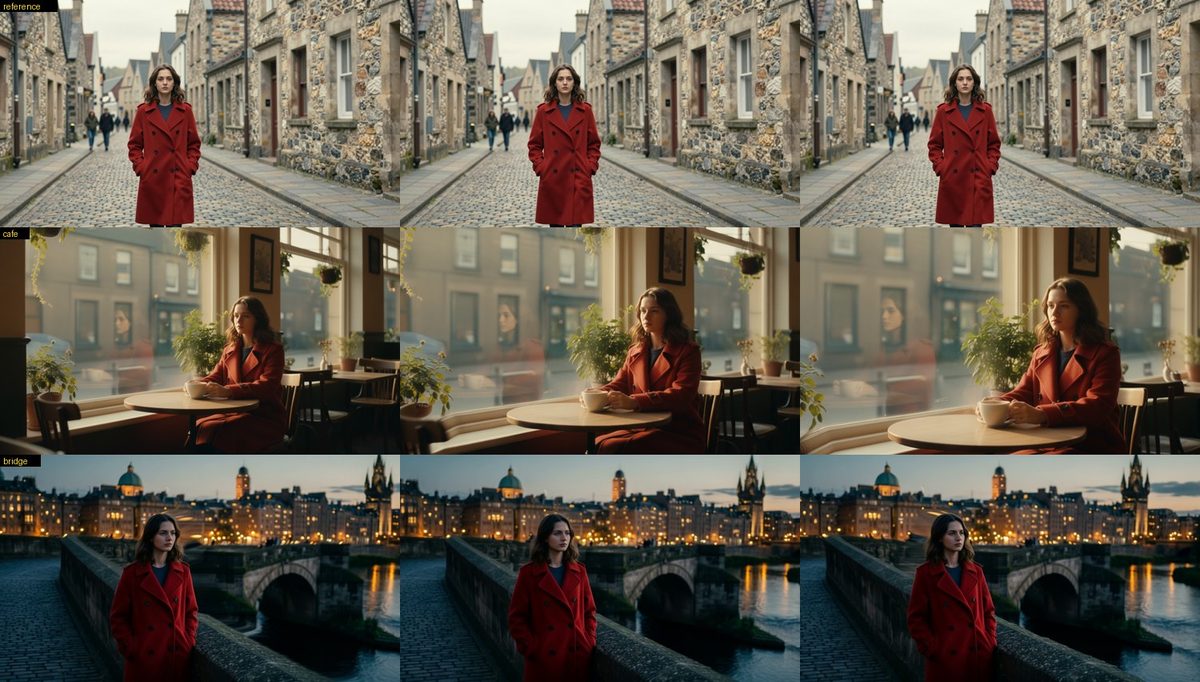
Tested with one reference (the woman in the red coat in a street) and two new scenes (a cafe window, a dolly-in; a bridge at dusk, an orbit): her face, hair, coat and its buttons stayed the same in both start pictures and through both moves. What it does not do: it keeps the subject's look, not the scene's (each beat's place comes from its prompt), and Qwen can add small inventions (a reflection of her in the cafe window). Each start picture costs one image edit (about a minute on a 4090, plus loading the editor).
Two video models: LTX-2.3 and Wan 2.2
Beats, takes and theme.art animate with LTX-2.3 by default. video_model: wan switches to Wan 2.2 A14B, a second
local model: a pair of 14B experts (one lays out the motion, the other paints the detail) that renders at its native
~1280x720 and 16 fps, retimed to 24 fps with FFmpeg's motion-compensated interpolation and restored to 1080p by the
SeedVR2 stage (beat_restore, take.upscale). Choose it for the whole site, or per beat, take or art:
video_model: wan            # site default (else studio.toml's video_model, else ltx)
wan: { quality: fast }      # fast: 4-step lightx2v LoRAs, cfg 1 · full: ~20 steps, cfg 3.5, no LoRAs (slower)
sections:
  - id: story
    type: film
    beats:
      - id: door
        prompt: ...
        motion: ...
        video_model: wan    # per beat; `image` is the first frame and `end_image` the last (first-last-frame)
        # ...
  - id: take
    type: film
    take:
      duration: 15
      camera: ...
      video_model: wan      # Wan 2.2 Fun Control paints the world along the Blender depth guide
      wan: { quality: fast }
      ltx: { segments: [...] }   # the same segments and prompts drive either model
A Wan clip is at most 81 frames (~5 s). A beat a little longer than that (up to wan.stretch, 1.35x) is one clip
played slower; a longer one chains clips, each starting on the last frame of the one before, with the end image on
the last. In a take, every segment is cut into clips of at most 81 frames along the depth guide; the first clip starts
on the keyframe at its start time and each clip takes the keyframe inside its range as a reference still. The product
pass is unchanged, so the real product stays locked to the same camera. Both models' renders are cached side by side
(a take's Wan render lives in .build/<section>/wan/), so switching back and forth costs nothing, and LTX caches made
before video_model existed stay valid. studio doctor lists every Wan file ComfyUI can see; file names that differ
from the defaults go in studio.toml under [wan].
Which to use: on the Feel door beat (start and end image given) the two land the same motion and, after SeedVR2, LTX
still shows the finer texture (it renders beats at 1920x1088; Wan at 1280x720), so LTX stays the default. Wan earns its
place in takes, where Fun Control at 1280x720 paints a crisper world than LTX at the example's 1024x576 and follows the
guide's shapes closely (blur the guide, wan.guide_blur, when a blockout box should become something better than a
box). On an RTX 4090 an 81-frame Wan clip samples in about 2.5 minutes (fast) or 25 (full), plus about 4 minutes to
load each 14B expert from a hard disk when they aren't already in RAM.
Flying through code
A code scene follows an AI agent through a codebase in live 3D, with real, readable text. It opens on the agent's
prompt box (terminal), the task types itself, and the camera dives through the screen into the project. Files the
agent reads line a corridor, each edit is a stop where the diff applies itself as you scroll (removed lines light up
and fold away, new ones type in), and a run prints its output line by line. A status bar ticks off each file's todo.
Steps pin themselves to the route with state: { file: <path> } (or terminal / outro), so captions never need
progress numbers:
  - id: session
    type: code
    length: 20
    terminal: { logo: "open|code", prompt: "add a field that validates signups are 18+", model: Claude Opus 4.5 }
    files:
      - { path: config/fortify.php, file: inputs/fortify.php }            # read
      - path: app/Models/User.php
        kind: edit
        todo: "User model: fillable + cast"
        code: |2
           protected $fillable = [
               'name',
          +    'date_of_birth',
           ];
      - { path: php artisan test, kind: run, file: inputs/test-output.txt }
    steps:
      - { title: "Every change, <em>a diff you can follow.</em>", state: { file: app/Models/User.php } }
For an edit, start each line with +, - or a space, like a diff (use |2 so YAML keeps the leading markers).
tree lists more paths to scatter around the route so it reads as a whole project.
Miniature worlds (diorama)
A diorama scene is a tilt-shift model of a tiny world (a harbour town, a market town, a desk, a factory floor, a studio)
drawn live in the page. The world is described once, and the engine lays it out in a couple of seconds on the CPU: ground,
water, roads, scenery, the places and their signs, and a camera plan. Scrolling orbits the camera round the whole thing,
dives to the place where a step's content sits, lifts back out and travels to the next. Shallow depth of field blurs the
near and far edges like a macro lens on a model, a high soft sun throws soft shadows, and the pointer turns the view.
Nothing is generated or rendered: no GPU job, no video, a few hundred KB of data. Phones get a wider lens and a lower pixel
budget, reduced motion gets one still view per place, and without WebGL the page shows a flat map of the world.
  - id: harbour
    type: diorama
    world: { kind: harbour, seed: 7 }          # harbour, town, desk, factory or studio
    camera: { orbit: ccw }
    look: { sun: golden, tilt_shift: 1.0 }
    places:
      - { name: Lighthouse, kind: lighthouse }
      - { name: Container yard, kind: crane, where: yard }          # a compass point, a spot, or [x, z]
    steps:                                     # an intro (the world whole), then one step per place, in order
      - { intro: true, title: "A whole <em>port</em> in your hand." }
      - { title: "See every ship.", body: "..." }
      - { title: "Every box, where it is.", body: "..." }
studio diorama <project> [--strip] says what was laid out (places, camera azimuths, the map in diorama/<id>-map.jpg) and,
with --strip, photographs the built site at every place and between places; the MCP tool diorama_layout does the same.
Things can move on it: one mover that the page follows from place to place (movers, with camera.travel: glide), and crowds wandering a grid on their own that never collide (traffic). Fields, the worlds' vocabularies, how it is built, what was measured instead (a generated photo, 2.5D, image-to-3D, splats)
and its limits are in docs/miniature.md. The showcase is examples/little-harbour.
Edited like a film (transition:)
Sections normally follow one another and the page just scrolls from one into the next. Give a section a transition: and
the join gets the editing language of film instead, driven by scroll. The picture above is held on screen at its last
frame, the one below is held at its first, and for a stretch of scroll (length, in screens) the two cut into each other:
sections:
  - type: film
    id: dusk
    transition: { type: match, shape: the sun, becomes: the rim of a cup }   # the sun becomes a coffee cup
    # ...
  - type: parallax
    id: morning
    transition: whip                       # a bare name is enough: a fast directional blur-pan into the next
    # ...
  - type: product
    title: ...
    transition: { type: carry }            # this section's heading travels into the next section's heading
type |
what it does | options |
|---|---|---|
cut |
an instant cut at a scroll position, a beat of hold either side, a slow push on each so the beat is alive | at (where it lands, 0.5) |
dissolve |
a held cross-dissolve | |
wipe |
the next picture revealed along a line | direction (left, right, up, down), angle, soft |
iris |
a circle opens from a point, or closes on this picture (closing) |
origin [x, y], soft, closing |
whip |
both pictures slide along direction, motion-blurred by how fast they move |
direction, blur |
match |
the end of this section and the start of the next share a shape: each side scales and moves until the two shapes coincide, and the picture swaps on the shape | shape, becomes, zoom, blend, at |
carry |
an element travels from its place here to its place in the next section (FLIP), the pictures cutting underneath (via) |
carry: {from, to, via} (CSS selectors; the headings by default) |
length is the stretch of scroll the cut takes (defaults from 0.8 screens for a cut to 1.5 for a match or carry) and
hold the share of it held still at each end. Everything keeps today's behaviour unless a section sets transition.
It works across section types because the layers it plays on are the sections' own pinned wrappers: a film, frames,
parallax, a block, a product render, a chart. A tall section is held by its last screen, so its own content scrolls first.
Scrolling is never intercepted (the stretch is plain scroll distance; anchor links and ?p= jumps land after it), pages
without scripts and visitors who ask for reduced motion get the plain flow (a clean cut), and phones get the same cuts at
their own size (the whip's blur is lighter). layout: stack already hands over by sliding a panel, so transitions are
ignored there. The default look and the styles that keep the ordinary page flow take them; styles that run the whole page
as one object of their own play their own hand-overs and drop the cuts, with a note (cuts: false in their style.yaml).
Match cuts, found or designed. The shapes are found on the last picture of this section and the first of the next:
transition:
  type: match
  shape: the round logo                        # a prompt: Florence-2 finds it, SAM 2.1 cuts it out (engine/region.py)
  becomes: { selector: ".ss-phone__screen" }   # or a page element, measured in the browser: any block, a phone screen
  zoom: 3                                      # the most each side may be scaled to bring the shapes to one size
shape and becomes each take a prompt, a box ([x0, y0, x1, y1] of the picture) or a selector; becomes defaults to
the same prompt as shape. Name neither and the engine looks for the best pair itself, without a model: circles and
rectangles (flat regions, outlined frames and screens, Hough circles) on each picture, paired by outline, size and place. That
is for graphic pictures (a logo, a sun, a frame); on a photograph name the shapes, and when nothing pairs convincingly the
cut dissolves rather than match on nothing. The shapes are stored in each picture's own coordinates and the page maps
them to the screen the way the section fits that picture, so one analysis serves every window shape; where a shape is
cropped out of view (a phone) the cut softens into a dissolve. Each side only ever zooms in, about a point that stays on
screen, so the picture always covers the screen. Cached in .build/_cuts/ by the two pictures and the prompts.
Or design the match instead of hoping for it: an image can be made to match another section's last frame.
  - type: hero
    id: sun
    title: ...
    image:
      match:
        section: mark                      # the section whose last frame to match (it is built first)
        shape: the white ring
        becomes: a huge glowing orange sun disc
        prompt: a calm dark sea at dusk, the enormous sun low over the horizon in the middle of the frame
        how: edit                          # edit: Qwen-Image-Edit redraws that frame; hint: Z-Image + the shape's place in the prompt
how: edit redraws the other frame (the shape stays where it is at its size; everything else is the new scene), how: hint
generates the picture from prompt with the shape's place and size, found on the other frame, written into it. Both are
ordinary cached images (an edit of an unchanged frame is never redone).
studio cuts <project> [--strip] [--only 0,2] [--mobile] [--reduced-motion] lists the cuts of the built site and the shapes
each match found, and with --strip writes a frame strip around every cut (.build/cuts/cut_<n>.jpg: the page before,
through the stretch of scroll, after; headless Chrome) to look at. The MCP tool cuts does the same. The showcase spec is
examples/film-cuts.